Tech Intuitors · Software development studio

We build the web apps, mobile apps and internal tools your business runs on.

We plan it with you, build it, ship it, and stick around afterwards to keep it running.

inventra-inv.vercel.app
Inventra, an offline-first POS we builtRead the case study →

What we do

Four things, done properly

Most projects mix a couple of these. A typical one is a web dashboard with a mobile app on top, or an existing system with some automation added.

Full-Stack Web

Web Development

Marketing sites, SaaS products and admin dashboards, usually built with Next.js and Node.

  • Landing pages. Fast, easy to edit, set up properly for search
  • SaaS products. Accounts, billing, roles and the rest of the plumbing
  • Admin panels. Back-office tools for the people running the business
Talk to us about this →
iOS & Android

Mobile Development

iOS and Android apps from one React Native codebase, taken all the way through App Store and Play Store review.

  • Cross-platform. One React Native codebase for iOS and Android
  • Store releases. Builds, store listings and getting through review
  • Native features. Push notifications, payments, camera, health data
Talk to us about this →
Design Systems

UI/UX Design

Screens and flows designed in Figma before any code is written, so you can click through it first.

  • Wireframes and prototypes. Rough flows first, then clickable designs
  • Design systems. Shared components so the product stays consistent
Talk to us about this →
LLMs & automation

AI Automation

Chatbots and automations that take repetitive work off your team, built on top of LLMs like GPT and Claude.

  • Chatbots. On your website or WhatsApp, answering from your own documents
  • Internal tools. Pulling data out of documents, emails and forms
Talk to us about this →

Our work

Some things we've built

A few recent projects: what the problem was and what we made.

POS / Retail · Live · 2026

Inventra

Point of sale and inventory that keeps working when the internet doesn't

A till, stock system and customer ledger in one browser app. It keeps selling offline, runs several branches, and one installation can serve many separate businesses.

Next.jsSupabasePostgreSQLOffline-first
Read the case study →

Developer tools · Beta · 2026

Histrova

Reword, squash, reorder or drop commits from a right-click menu, with an Undo button on every action and a side-by-side conflict solver.

VS Code extensionTypeScriptReactGit
Read the case study →
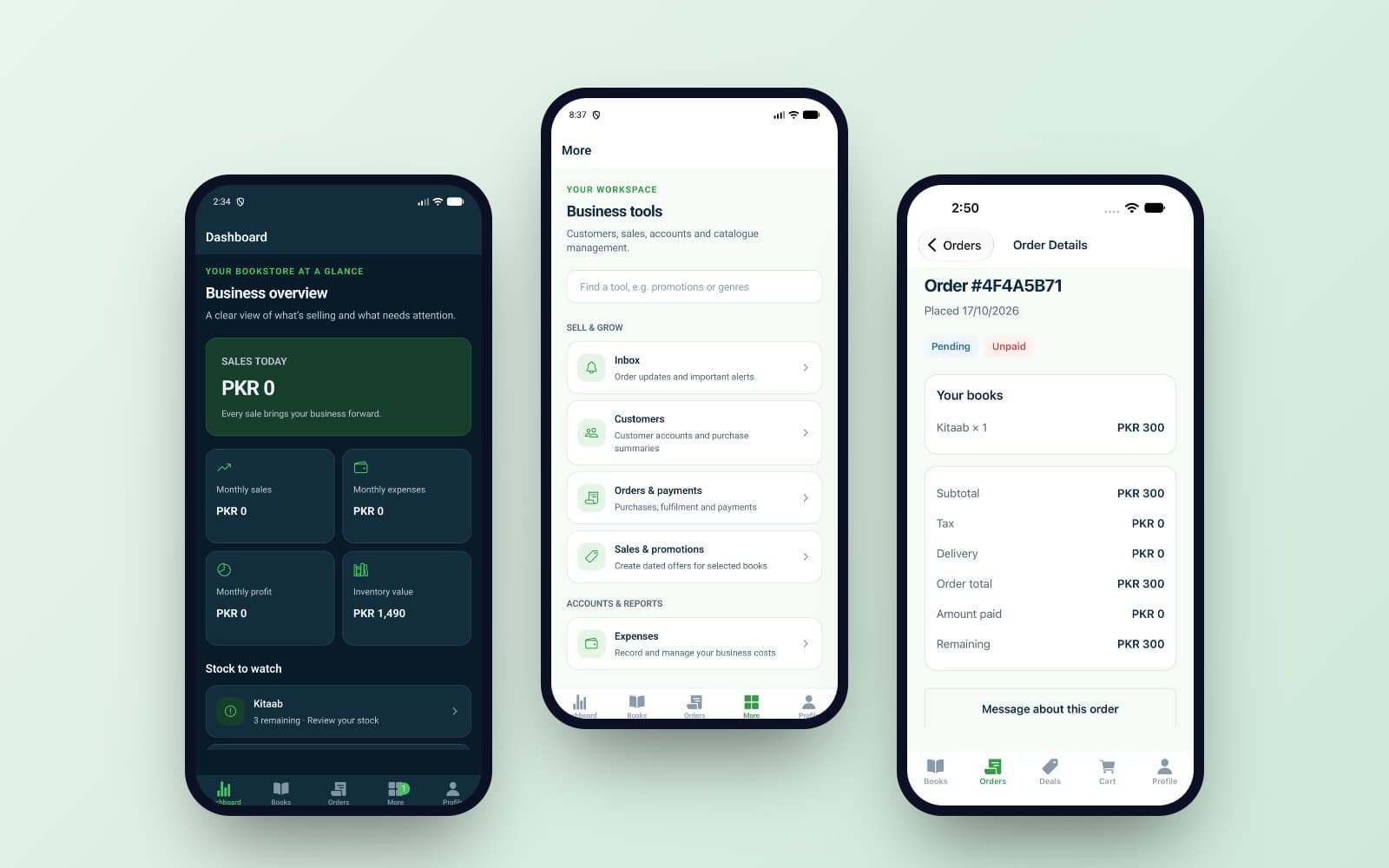
Kitab Ledger's dashboard, business tools and an order on three phones

Mobile · Pre-launch · 2026

Kitab Ledger

Books and stock, customer orders and part payments, promotions, expenses and reports, in an iOS and Android app plus a web admin panel.

React NativeExpoSupabaseReact
Read the case study →

POS / Retail · MVP · 2026

Memon Optics

Type a mobile number and the customer's last prescription comes up. Glasses, lens, frame and repair orders, advances and balances, and reports on what's owed.

ReactTypeScriptViteTanStack Query
Read the case study →

POS / Retail · MVP · 2026

Mehak POS

Built for counters that used punch-pad machines: one tap or one key per item, cash or card, a printed receipt, and daily sales. Name, logo and menu are set by each business.

Next.jsTypeScriptSQLiteThermal receipts
Read the case study →

Currently building

  • Attendance Management SystemStaff check in, check out and take breaks. Admins verify staff, run payroll and generate attendance, leave and payslip reports.
  • Apple Dev ConsoleAdd your own App Store Connect API keys and manage any Apple developer account you have access to, from one place.

How we work

What working with us looks like

The same seven steps on every project, so you always know what's happening and what comes next.

  1. 01

    Discovery

    We talk to you and, where we can, the people who'll use the software. The goal is to agree on what problem we're solving and what's out of scope, before anyone writes code.

    • Scope document
    • Rough timeline
    • Risks we can see
  2. 02

    Planning

    We choose the stack, sketch the data model and APIs, and break the work into milestones you can check against.

    • Architecture outline
    • Database schema
    • Milestone plan
  3. 03

    Design

    We design the main screens and flows in Figma and you click through them. It's much cheaper to change a design than to change code.

    • Figma designs
    • Clickable prototype
    • Shared components
  4. 04

    Development

    We build in short cycles and show you working software as we go, so there are no surprises at the end. Every change is reviewed by a second engineer.

    • Working builds
    • APIs
    • Regular demos
  5. 05

    Testing

    Automated tests for the important paths, manual testing on real browsers and devices, and a look at performance and security before launch.

    • Automated tests
    • Security check
    • Performance check
  6. 06

    Launch

    We set up hosting, the domain, SSL and a deployment pipeline, then launch and keep a close eye on things for the first few days.

    • Production hosting
    • Deployment pipeline
    • Domain and SSL
  7. 07

    Support

    After launch we can keep looking after it: monitoring, security updates, bug fixes, and new features as the product grows.

    • Monitoring
    • Security updates
    • New features
  8. Step zeroTell us what you needA short message is enough to start →

Tools

What we build with

We stick to a small set of well-known tools. That way any good developer can pick up the code after us, including your own team.

React

Web interfaces

Our default for anything with a user interface.

Next.js

Web apps

Most of our websites and web apps. Pages load fast and search engines can read them.

Tailwind CSS

Styling

How we style things. It keeps designs consistent and easy to change later.

React Native

Mobile apps

One codebase for both the iOS and Android apps.

Node.js

APIs

APIs and background jobs, in the same language as the frontend.

NestJS

Larger backends

For bigger backends where structure matters, like POS and HR systems.

Supabase

MVPs

Database, login and file storage in one place. Good for getting an MVP out quickly.

PostgreSQL

Database

The database we reach for first. Reliable, and it handles most workloads well.

AWS

Hosting

Servers, file storage and video delivery when a project needs more than Vercel.

Vercel

Hosting

Where most of our Next.js sites live. Every change gets its own preview link.

FAQ

Questions people usually ask

Pricing, timelines and what happens after launch.

Something else? Ask us directly →

It depends on what it needs to do. As a rough guide, a standard web app starts around $3,000 to $5,000, and bigger systems like a SaaS platform or a POS cost more. After a first call we send a fixed price, broken down by milestone, so you know the total before we start.

A landing page usually takes 1 to 2 weeks. A full web app or a mobile app is usually 4 to 8 weeks. We send an update every week so you can see where things are.

Yes. After launch we can keep looking after the app: monitoring, security updates, bug fixes and new features. We agree on response times with you up front.

Yes. We build mobile apps with React Native, so one codebase covers both iOS and Android, and we handle the App Store and Google Play submissions.

Yes. We start by reading through what you have and telling you honestly whether to fix it or rebuild it. Either way, we move things over in stages so your live data and day-to-day work aren't disrupted.

Contact

Tell us what you're building

A few lines is enough to start. We'll read it, ask anything we need to know, and come back with how we'd approach it and a rough cost.

Prefer email or a call?

That's fine too. Email, WhatsApp or give us a ring.
Rough budget